A tattoo artist breaks down the best design apps and software for sketching, stencils, and client previews, plus where AI tools actually fit.
Every custom tattoo starts as a digital file. Long before the needle touches skin, it moves through sketching, refinement, and a stencil.
The app you pick at each stage changes how fast you work and how clean your line work stays. This guide walks through my real toolkit, stage by stage, with pricing, hardware notes, and a clear stance on where AI generated designs actually fit.
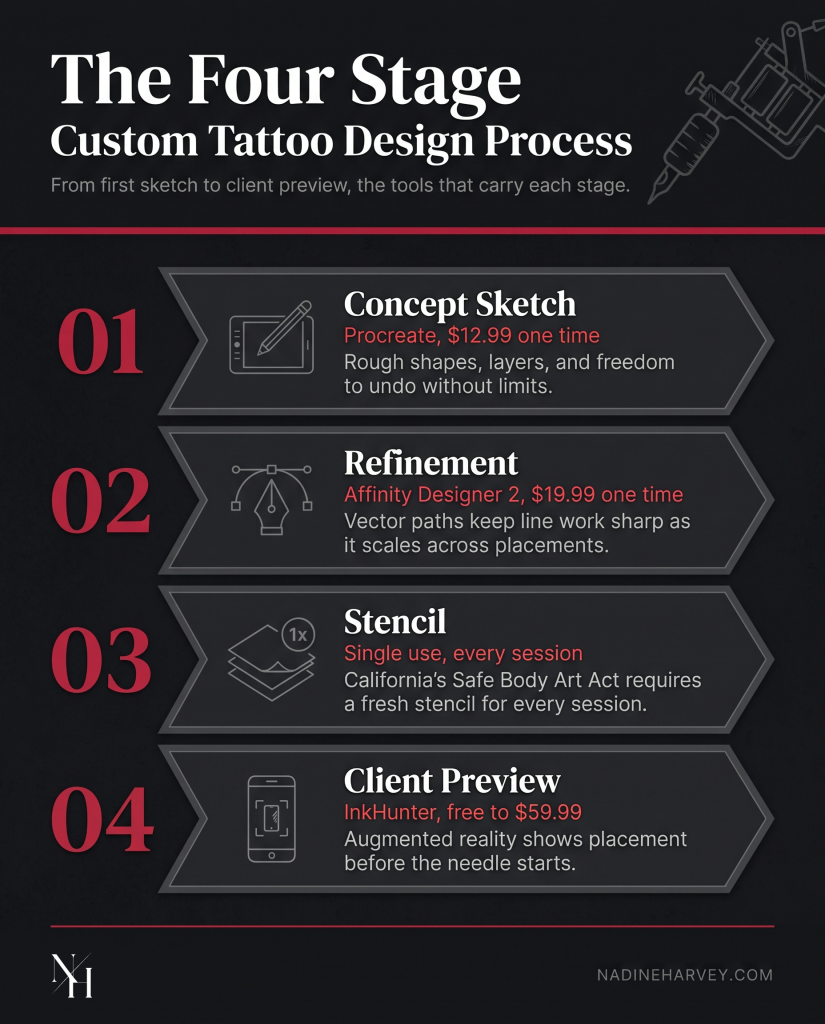
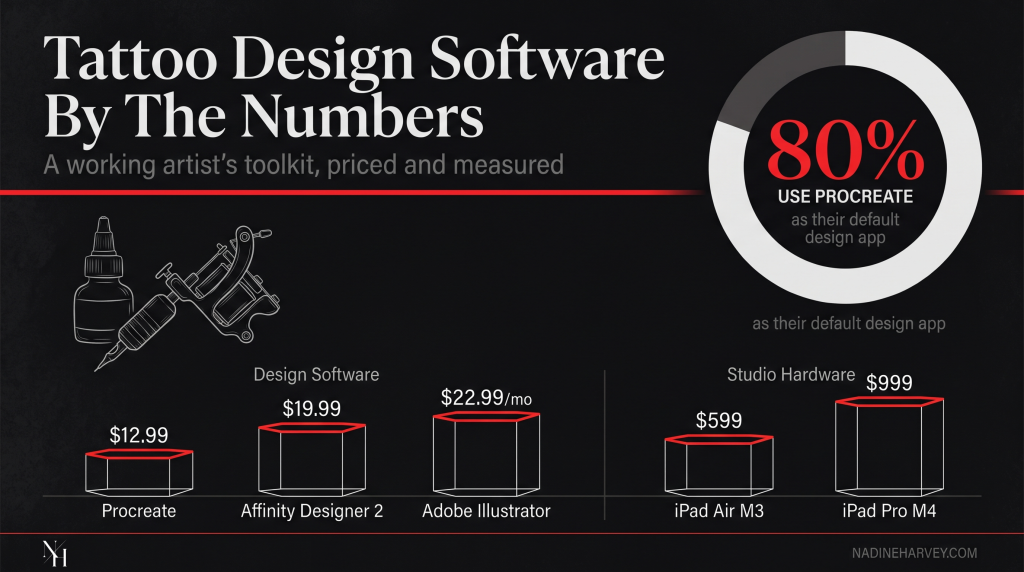
No single app covers a full custom tattoo. Most artists move through four stages. Those are concept sketching, refinement, stencil creation, and client preview. Procreate covers the first two stages for most artists. A 2026 hands on test of seven iPad design apps called it the default tool for 80 percent of tattoo artists. Vector apps and preview apps fill the gaps Procreate leaves open.
Thinking in stages, not app rankings, changes how you shop for tools. You stop asking which app is best. You start asking which stage needs help right now.
| Stage | Best Tool | Type | Starting Price |
|---|---|---|---|
| Concept Sketch | Procreate | Raster | $12.99 One Time |
| Vector Refinement | Affinity Designer 2 | Vector | $19.99 One Time |
| Client Preview | InkHunter | Augmented Reality | Free, With Add Ons Up To $59.99 |
A client comes in wanting a black and grey micro realism piece. I sketch the rough composition in Procreate during the consult. Once the client approves the shape, I clean up the line work and build the stencil.
You can see finished results from this exact process in my tattoo portfolio.
Procreate is the fastest way to get a first idea on screen. It costs a one time $12.99 with no subscription. The brush engine mimics pencil and ink closely enough that early sketches feel natural. For most styles, this is where a custom design should start.
Procreate uses layers, so you can separate a rough shape from fine detail. You can undo freely without ruining a sketch. That freedom matters most in the first ten minutes of a consult, when a design is still changing shape.
“I keep every layer separate until a client approves the shape. That one habit has saved me from redrawing a sketch from scratch more times than I can count.” Nadine Harvey, Tattoo Artist
Not every concept starts the same way. A few situations call for a different first step.
Vector tools protect line work as a design moves across body placements. Raster apps like Procreate build images from pixels, which can blur when stretched too far. Vector apps like Adobe Illustrator and Affinity Designer 2 build images from math based paths. Those paths resize without losing sharpness.
Raster is best for texture, shading, and painterly detail. Vector is best for clean outlines that need to scale, like lettering or geometric work.
Adobe Illustrator costs $22.99 a month for an individual plan, based on Jotform’s breakdown of apps for tattoo artists. Affinity Designer 2 costs a one time $19.99, with a desktop license included. For artists who refine designs daily, that one time cost adds up to real savings over a year of Illustrator’s subscription.
Different styles lean on different tools during refinement.
A stencil is more than a design file. It is a product that touches skin. California’s Safe Body Art Act requires that any product applied to skin before tattooing, including stencils, be single use. No app changes this rule.
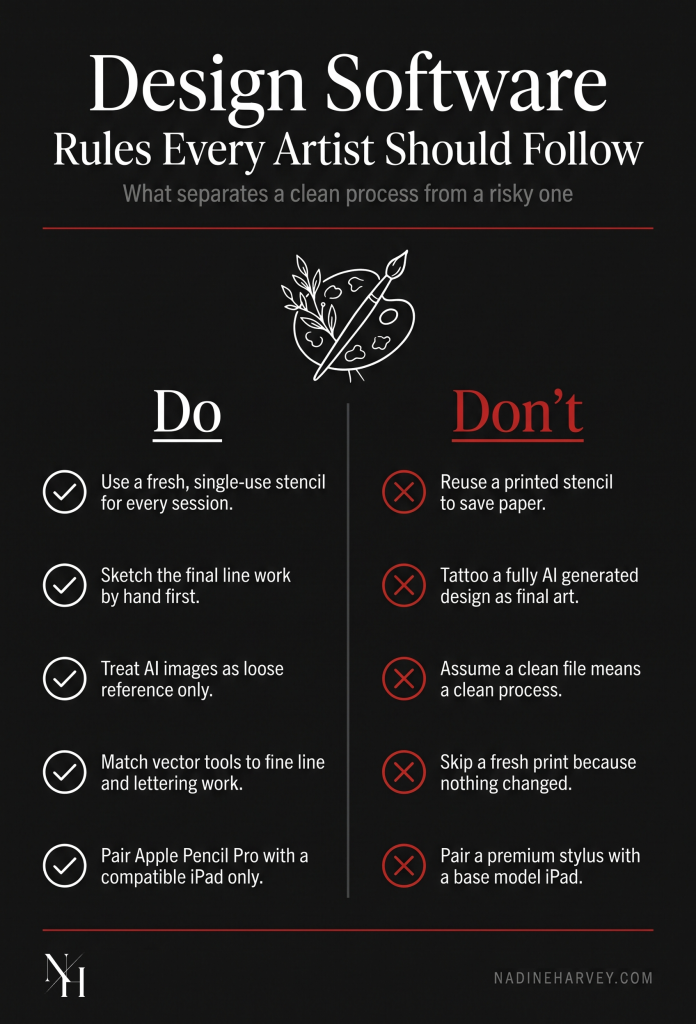
The regulation covers any transfer product used before the needle starts. That includes printed stencils and transfer paper. Once a stencil touches skin, it gets discarded.
A few habits create real problems, even with good design software.
Software handles the design. Sanitation rules handle everything after that. Both matter, and neither replaces the other.
“A fresh stencil for every session is not optional in my studio. It is the baseline every client should expect.” Nadine Harvey, Tattoo Artist
Augmented reality apps let a client see a design on their own skin before committing. InkHunter offers a free tier for this, with in-app purchases ranging from $6.99 to $59.99, according to GlossGenius’s pricing breakdown. This step reduces last minute changes and builds client confidence.
I upload the near final design and place it directly on the client’s arm or shoulder using their phone camera. They can turn, walk, and see the piece in real light. This step happens after the stencil is ready, not instead of it.
An AR preview shows placement and rough scale. It does not show how the skin will read the finished linework or shading. That judgment still comes from experience, not the app.
AI generated images cannot hold copyright under current United States law. On March 2, 2026, the Supreme Court denied review in a case testing whether AI generated art can be copyrighted. That leaves the existing rule in place. A work needs a human author to hold copyright.
This matters for clients who bring an AI generated reference to a consult. If that image was fully AI made, no one legally owns it. That includes the client, and it includes the artist who tattoos it.
Scale adds another layer. Over 34 million AI images get generated every day, based on one industry analysis of AI copyright issues. Many of those tools trained on scraped tattoo artist work without permission.
I use AI generated images as loose reference only, never as a final design. A tattoo artist at Alchemist Tattoo took a similar public stance, choosing to keep AI out of his hand drawn design process entirely. Every custom piece I tattoo gets drawn by hand before it becomes anything else.
“I only tattoo what I draw myself. An AI reference can spark an idea, but it never becomes the final line work in my studio.” Nadine Harvey, Tattoo Artist
You can read more about that approach on my about page.
The app only performs as well as the hardware behind it. The iPad Air M3 starts at $599. The iPad Pro M4 starts at $999 for the 11 inch model, based on the same 2026 hands on iPad app test cited above. Either tier runs Procreate well.
The Air fits artists who draw regularly but do not need the top display. The Pro fits artists drawing daily on large, layered files.
The Apple Pencil Pro only works with the iPad Pro M4, iPad Air M2 and later, and iPad Mini A17 Pro. Pairing it with an older or base model iPad wastes the upgrade. Check compatibility before buying either piece separately.
The right toolkit follows your process. It does not follow a ranked list built for every artist at once. Start with Procreate for concept work. Add a vector app once lettering or scaling becomes a regular part of your job. Add an AR preview app once client confidence at consult becomes the bottleneck.
I built this exact toolkit over eight years across fine line, anime, horror, and black and grey realism work. My modeling background shapes how I think about presentation too. Both jobs depend on getting an image right before it becomes permanent.
You can see how both sides connect on my model page.
If you want a custom piece designed and tattooed this way, you can book a consultation.
Procreate. It costs a one time $12.99 and covers sketching through stencil prep for most styles.
Only if your work leans on lettering or geometric designs that need clean scaling across sizes.
No. California’s Safe Body Art Act requires stencils to be single use and discarded after each procedure.
It carries legal risk, since AI generated images cannot hold copyright. Use AI images as loose reference only.
The iPad Air M3 at $599 fits most artists. Choose the iPad Pro M4 if you draw daily on large files.
Placement and rough scale on their own skin. It does not replace an artist’s judgment on final line work or shading.